Properties Interface Panel
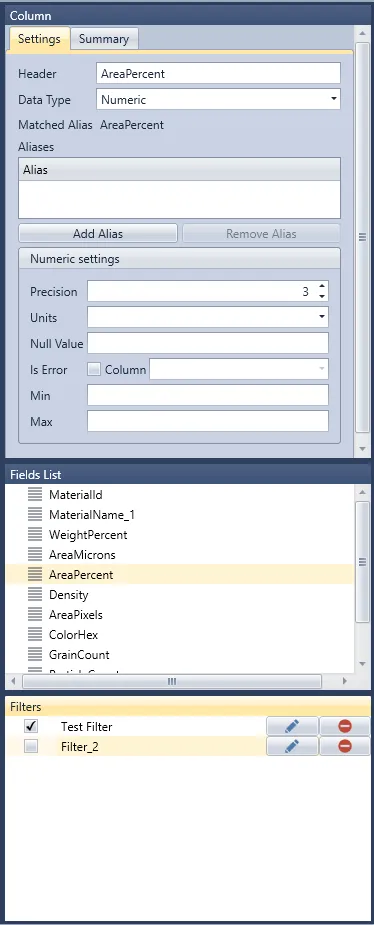
The Properties Interface Panel is used mainly to change the metadata and properties of the data displayed in the Main Visualisation Interface. It is divided into three subpanels: Column, Fields List, and Filters.
Column Subpanel
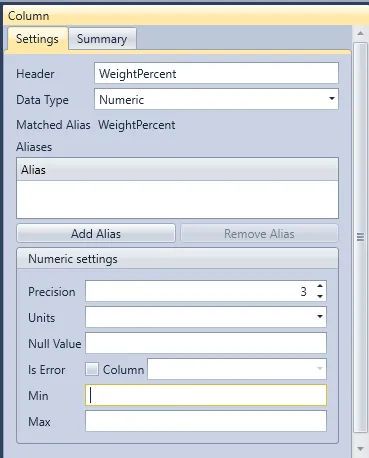
The Column Subpanel allows for modifying metadata associated with the selected column. The metadata option for the column will be different depending on the associated data type, with the Numeric data type containing the most options available to all Data Types and allowing users to use them. Options are available to all data types and are permitted. As such, this data type will be used for this section.
The Header properties represent the name of the column.
The Data Type will define how the data will be stored and what data interactions are possible.
The Aliases section is avalibale to all Data Types, and allows the users assign an additional "name" to reference the column.
The Numeric settings are set specific for the Numeric data type.
- Precision - Set the number of decimal points.
- Units - Assign a unit to the column.
- Null Value - Define how nulls are registered in the data set.
- Is Error - Assigns the column as an uncertainty value associated with the Column indicated.