Global Binning
A new binning column can be added using the "Add Binning" button in the Main Menu. It should be noted that unlike Grouping, Binning can only be applied to numeric data columns. When the "Add Binning" button is pressed a new Binning pop-up window interface will open allow users to create a new bin in the selected data table.
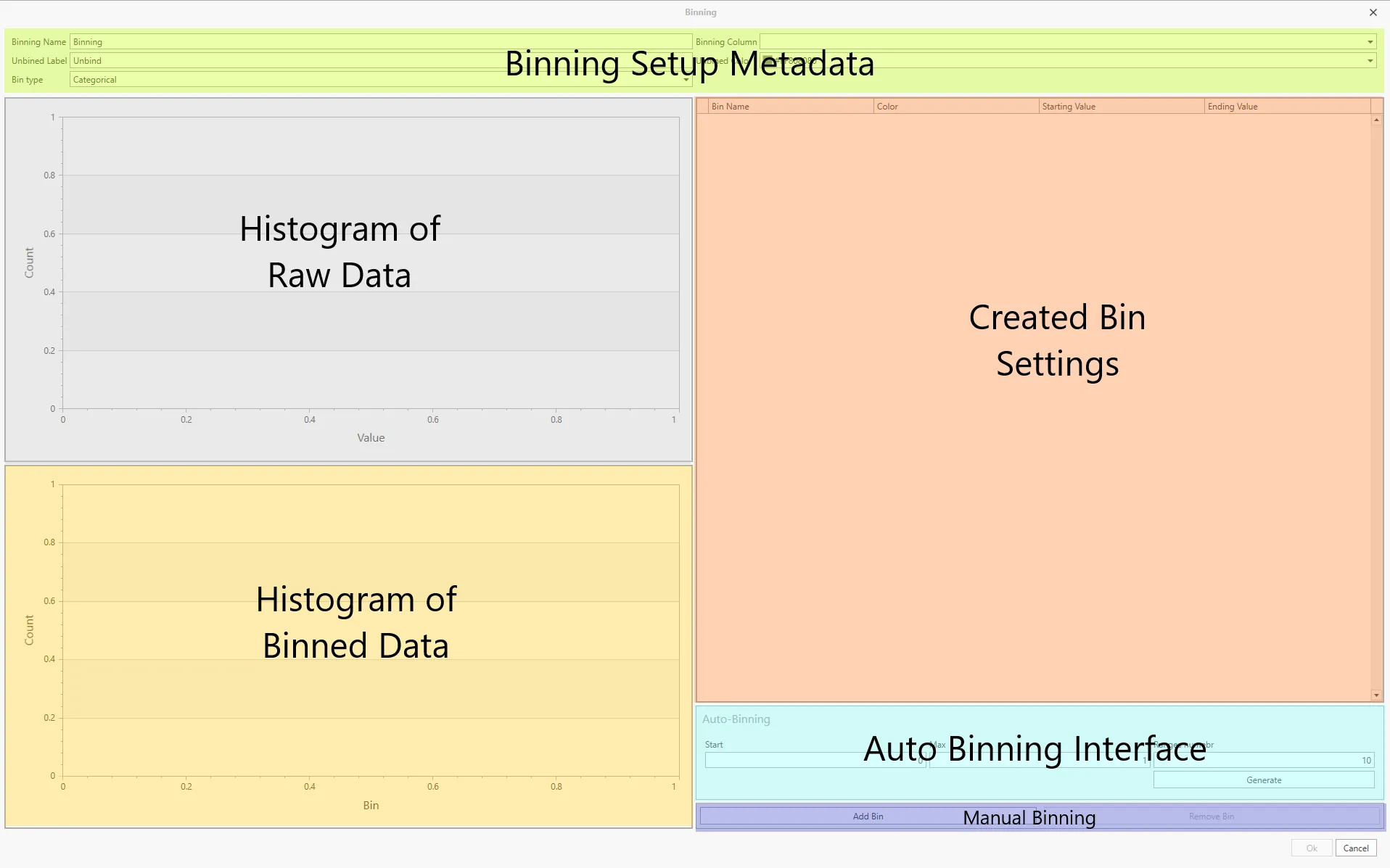
The Add Binning interface has six distinct panels/components, as highlighted in the above image.
Binning Setup Metadata - This section of the interface contains all the options to change the description as well as some base settings for the new Bin. This includes:-
- Binning Name - This textbox allows users to select the description of this bin, which will be displayed at the top of the new column.
- Unbinned Label - This textbox allows users to select the the description of values which do not fit into any of the user created bins.
- Bin Type - Currently only a Category bin type is selectable using this option.
- Binning Column - This dropdown list allows users to select a valid, i.e. numeric data type, column of data in the selected data table.
- Unbinned Color - This dropdown interface sets the color used to describe the Unbinned values in the Dashboard view.
Histogram of Raw Data - This panel will be populated by the numerical data once a Binning Column has been selected in the Binning Setup section (as above).The x-axis is automatically set to the lowest (left hand) to the highest (right hand) value in the selected data column. And the y-axis plots the frequency of the unbinned data. This provide an indication to the user the ideal bin for the data.
Histogram of Binned Data - This panel is similar to the above plot, except this panel will plot the raw data in the created bins, and will be updated as new bin are created or removed.
Created Bin Settings - This panel will contain all the bins created by the users or auto generated by AMICS Reports. This panel will contain, from left to right, the name (text) of the bin, the color (for dashboard), the lower starting value, and the higher ending value.
Auto Binning Interface - This panel allows users to have AMICS Report generate bins automatically. This is done by assigning a start (Start) and the ending (Max) value, and the number of bins required (Ranges numbers). Once the "Generate" button is pressed, Reports will then create equally spaced bins between the start and end value.
Manual Binning - To manually create bins, users can use the "Add Bin" to create a new row in the Created Bin Settings panel. The user will then need to manually enter the data in the newly created bin.